I’m a scientist at TNO by day, and an avid birder the rest of the time. A few years ago that combination did what it usually does: I downloaded and used all the birding apps on the market, decided none of them worked quite the way I wanted, and built my own instead.
That became Limosa (named after the Black-tailed Godwit, the national bird of the Netherlands): a social birding app for logging sightings with photos, video and sound and sharing them with other birders, with a UI optimized for field use that keeps adding a new sighting to as few taps as possible.
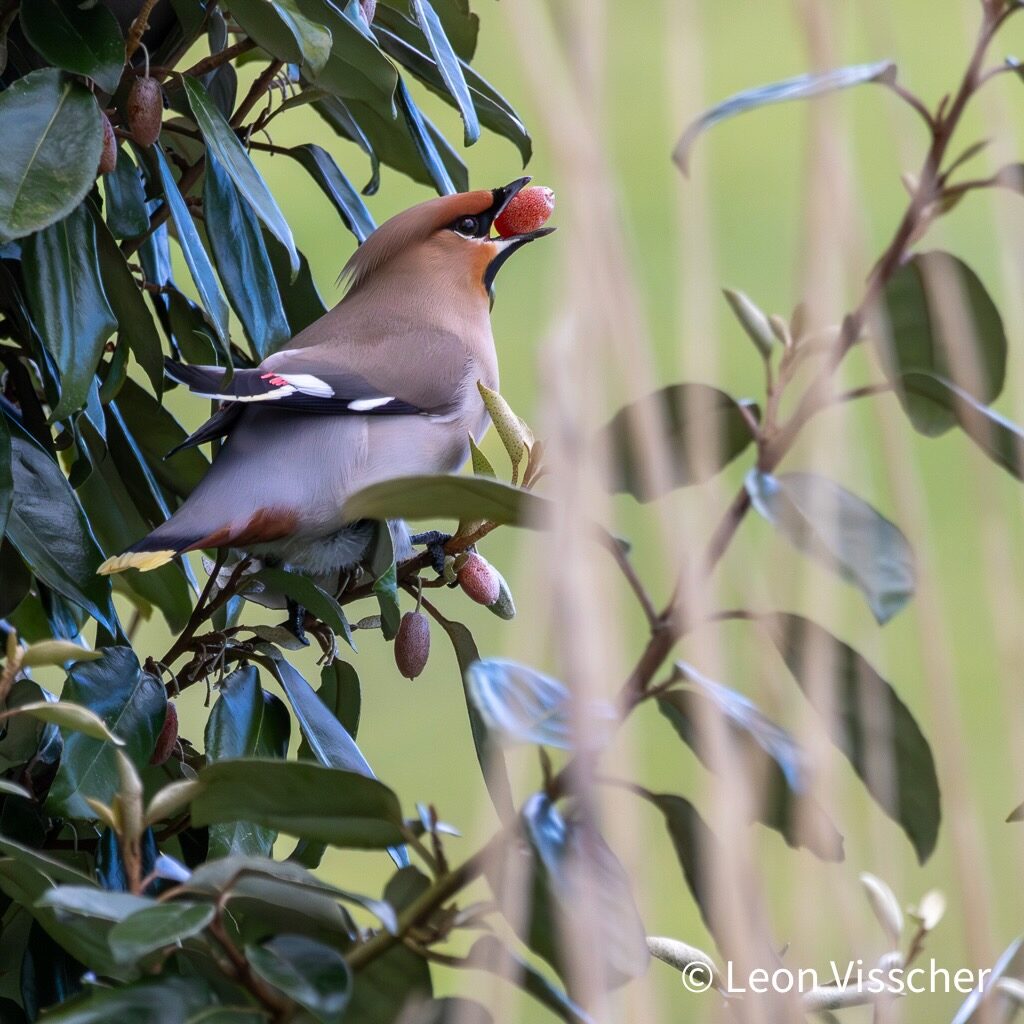
 Bohemian Waxwing Bombycilla garrulus 94%
One of the more complex features that other birding apps do offer is species identification: you take a photo, video or sound recording, and the app tells you what species it is. Of course, I wanted that too. In this blog post I will explain how I went from my initial naive approach, calling a general-purpose AI over an API, to a self-hosted pipeline that runs both on my server and on-device, performs better than the original, and did not require me to train my own model, all while respecting licensing and privacy concerns.
The easy way: a multimodal API call
The obvious way took an afternoon: take whatever the user submitted, a photo, a video or a sound recording, hand it to a general-purpose multimodal AI over an API, ask what species this is, and show the answer back. It works. It ships. For a lot of products that’s a fine approach, but for my purpose it was not quite right.
I didn’t keep it, for reasons that kept adding up:
- To start with, this approach requires me to send my users’ data to a third party. That includes photos, videos and sound recordings, as well as the GPS locations used to improve the AI’s answer, since some species are only found in certain areas. That is a lot of sensitive data to hand over for a single label.
- The service is a black box: it can be wrong, and you have no way to know why. You can’t inspect the training data, you can’t see what it knows, and you can’t fix it if it makes a mistake.
- It rules out a fully offline mode: the model lives on someone else’s servers, and you can’t run it on-device.
- Every request costs money, and the pricing is not transparent. There is no way to know in advance what it will cost to run the model on your users’ data.
Describe first, compare second: embeddings and a reference library
Instead of asking a model in one go which species is in a photo, you can split that question in two: first turn the media into something you can compare, and only then compare it. It looks like a detour, but it takes the black box out of the middle of the process.
For that, use a model that just describes what a sound or image is like: as a list of numbers, an embedding. Two recordings of the same species land close together in that space, while a different species lands further away. The model never learns a single species name.
And that is the difference that makes all of this possible: models like these are simply there to download, under licenses that allow commercial use. A general-purpose AI behind an API cannot be downloaded and cannot be self-hosted, so you stay dependent on that one service. An embedder runs on my own server, or even on the phone.
Then, separately, build a small reference library: embed a handful of confirmed examples per species and average them into one reference vector each. No training run, just an average. To identify something new, embed it and find the nearest reference. Closest one wins, and how much closer it is than the runner-up becomes the confidence, measured from the comparison, not invented by the model.
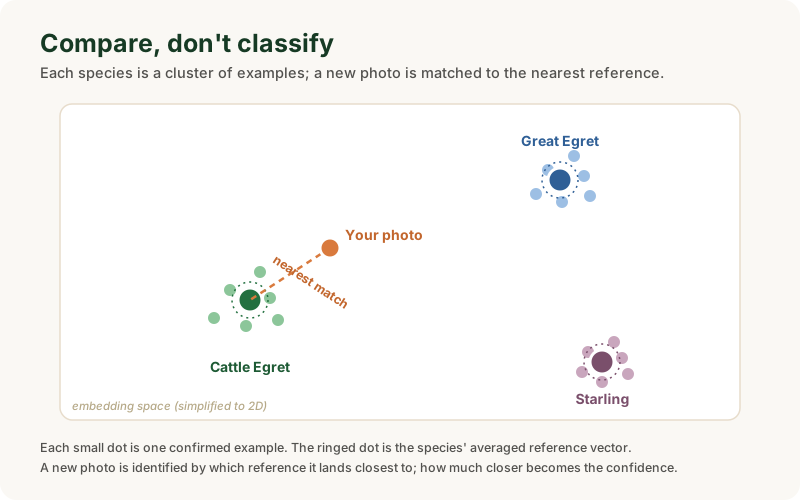
The thing that turns a photo or a sound into an embedding is called the embedder, or the trunk of the model. Ready-made, downloadable versions of it exist under the right licenses: Perch for sound, BioCLIP 2 for images.
Take a fully ready-made classifier and you get a trained head on top of that trunk: the layer that maps the embeddings onto a fixed list of species. That head is where by far the largest part of the file size lives.
By using only that trunk and putting a list of reference embeddings next to it yourself, you don’t have to pull in the full model. With Perch that saves an enormous amount: the whole model is about 407 MB, and the overwhelming majority of that is the head that knows 14,000 species. What is left is a 23 MB trunk, with the reference library and the comparison adding about 1.6 MB on top.
For images it works out differently: there the trunk itself is a big network, around 300 MB. You download it once, and after that photo identification works fully offline as well.
There is a second, quieter benefit. Because the head is now a library of reference vectors instead of one big trained blob, I do not have to hand every user the whole thing. A birder in the Netherlands does not need the references for the birds of Australia, so the app can ship the shared trunk once and then just the regional slice of references that matches where you are. That slice can grow, species by species, without anyone retraining or re-downloading a model, and it keeps each user’s download small.
None of this is my invention. Once I started reading, I found that every piece of it already had a name in the literature. The embed-and-compare idea is Prototypical Networks for Few-shot Learning (Snell, Swersky & Zemel, NeurIPS 2017), which classifies by distance to a class prototype instead of a trained decision boundary, and which the authors even tested on birds. The audio embedder I use, Perch 2.0 (van Merriënboer et al., Google DeepMind, 2025), describes itself as trained “with self-distillation using a prototype-learning classifier”, which is exactly the same shape. On the vision side there is a direct match in BioCLIP 2 (Gu et al., NeurIPS 2025), which explicitly supports classifying against a small support set rather than a fixed trained head. And the idea of folding in location and season goes back to Presence-Only Geographical Priors (Mac Aodha, Cole & Perona, ICCV 2019), with BirdNET running a production version of it on eBird data.
So this is all established, published work, some of it from the exact team whose model I run on-device. What I got out of assembling it that way is a pipeline with no retraining step, a confidence score that actually means something, and full control over the species list.
Taking location into account: GPS range and season as priors
There is one more signal worth using: where and when the sighting was made. Many species only occur in certain regions or seasons, and since Limosa records the GPS location of every sighting, it knows whether a candidate is a local regular or well outside its usual range.
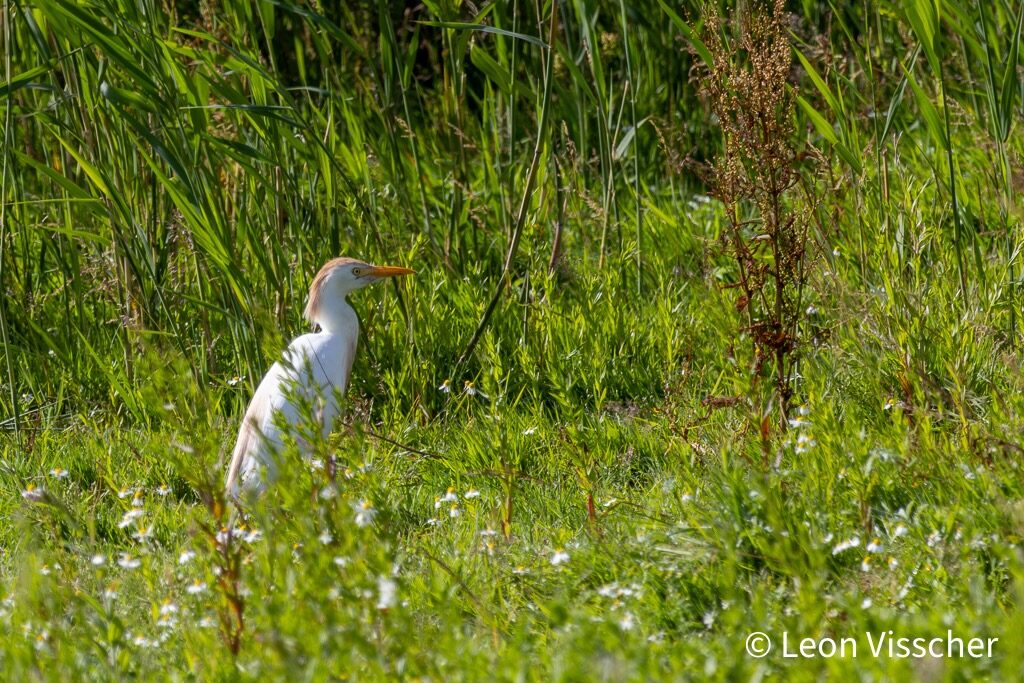
 Cattle Egret Ardea ibis 91%
The obvious thing is to rule out anything unlikely for the area, but that quietly buries the vagrants: the rare birds that turn up far from home, which are often exactly the sightings a birder is most excited about. So location never gets a veto. It can gently lower the score of an uncertain guess, or nudge a likely local up, but a confident match always comes through, however improbable the bird. A genuine rarity that you actually photographed still gets identified.
One pipeline for photo, sound and video
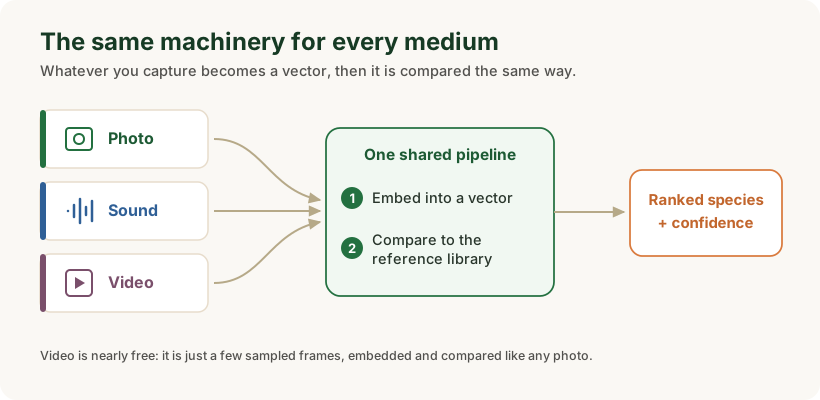
Because identification is now just embed-and-compare, photo, sound and video all run through the same machinery. Sound identification runs on-device, so it works in the field without a connection. Photo uses the same approach, in both the web app and the phone app. And video came almost for free once the other two existed: a video is just a handful of frames, so I sample a few, embed them, and compare, which costs a fraction of asking a model to reason about the whole clip.
None of this needed a bigger or fancier model. It needed a reference library instead of a trained classifier, and a confidence score that falls out of the comparison itself. The same small embedders handle all three kinds of media, both on my server and on the phone.
If you would like to see it in action, you can try it on your own sightings: open the web app at app.limosa.online, or head to limosa.online to download the app and read more.
This isn’t really about birds: the same pipeline for any reference library
Nothing here is truly bird-specific. Swap the reference library and the same pipeline answers “is there an X in this medium?” for whatever you care about: the right product in a photo, a defect in a weld, a particular speaker in a recording. Embed the media, compare it against a handful of confirmed examples, and read the confidence straight off the comparison.
If you would like to point something like this at a problem of your own, I would be glad to hear about it. Or get in touch if you want a second pair of eyes on a model or codebase.